Vertical slice structure
Feature work is organized by business capability so handlers, routes, validation, and contracts stay easier to trace as the system expands.
Minimal APIsFluentValidationRefit contracts
Krafter is a dotnet new template pack combining Vertical Slice Architecture, hybrid
Blazor, Aspire, permission-based auth, and an agent-friendly project structure. Pick Split
Host for separate API + UI, or Single Host for one combined process —
both ship the same feature foundation.
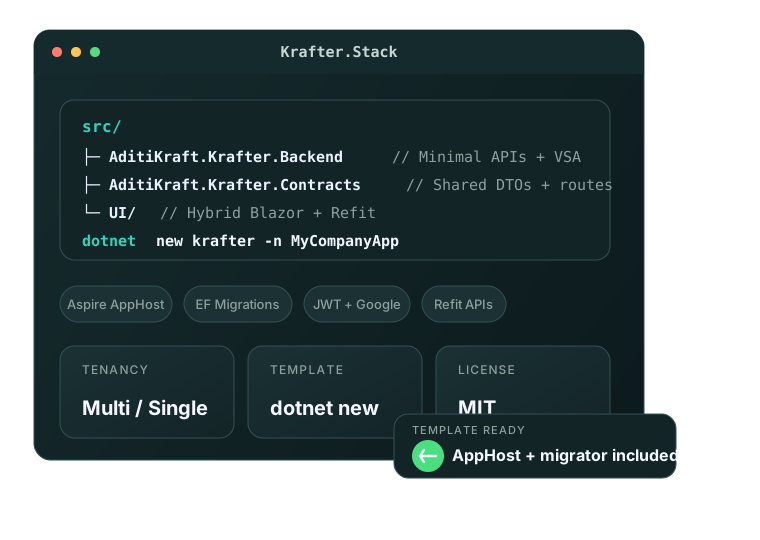
Instead of asking teams to assemble architecture, auth, tenancy, and developer workflow from scratch, it gives them a credible baseline that behaves like a real product.
Feature work is organized by business capability so handlers, routes, validation, and contracts stay easier to trace as the system expands.
Start from a multi-tenant baseline with room to support single-tenant products, isolated behavior, and tenant-aware APIs.
JWT auth, refresh tokens, Google login, and permission-aware authorization are part of the starter instead of postponed into riskier later work.
Scoped guidance and explicit project boundaries reduce ambiguity for teams using AI-assisted workflows alongside conventional engineering.
Krafter handles the platform foundation so your team spends time on business logic, product fit, and differentiated workflows instead of rebuilding the same infrastructure on every project.
Krafter combines structured backend slices, authentication, and dependable local orchestration so new features land on a foundation that stays understandable as the codebase expands.
Routes, handlers, validation, and contracts follow a consistent VSA flow that keeps review and extension work predictable.
JWT, refresh tokens, Google OAuth, and permission-aware checks are built in instead of pushed into a risky later phase.
AppHost boots the migrator before the API so schema changes and startup sequencing are part of the normal developer path.
dotnet run --project
aspire/AditiKraft.Krafter.Aspire.AppHost/AditiKraft.Krafter.Aspire.AppHost.csprojchecked-in migrations applied cleanly
auth, endpoints, and contracts available
serving on https://localhost:7291
Krafter is opinionated enough to accelerate delivery, but explicit enough that teams can still reason about structure, trace behavior, and extend the system without losing confidence.
Blazor UI modes, Refit clients, and shared contracts create a strongly typed path from browser interaction to API behavior.
Aspire and OpenTelemetry are part of the architecture from the start, reducing the need for a later operations rewrite.
Scoped guidance, explicit feature boundaries, and predictable project structure make AI-assisted work more dependable instead of more chaotic.
Hybrid rendering with typed shared contracts.
Strongly typed boundaries between UI and backend slices.
Operational defaults that scale past localhost.
Krafter is opinionated where it prevents drift and flexible where product teams still need room to adapt domain behavior, infrastructure choices, and delivery pace.
ASP.NET Core Minimal APIs, EF Core 10 with PostgreSQL or MySQL, FluentValidation, soft delete, and dedicated DbContexts for app data, tenants, and background jobs.
Blazor Web App render modes, Radzen components, Refit-based typed HTTP clients, and shared contracts keep the UI strongly connected to backend behavior.
SignalR for live updates with typed method contracts, plus TickerQ for scheduled and recurring background processing — wired in from day one through their own context.
Aspire orchestration, OpenTelemetry, health checks, structured logging, Docker support, NUKE build automation, and GitHub Actions workflows are part of the default delivery path.
ASP.NET Core Identity, JWT access tokens with refresh, Google OAuth, and a permission-based authorization model give teams a baseline they can extend with less rework.
The startup path is intentionally short, but still opinionated enough to keep local setup, migrations, and the first extension work aligned with the repo model.
Run dotnet new install AditiKraft.Krafter.Templates once, then scaffold a renamed solution with dotnet new krafter -n MyApp (Split Host) or dotnet new krafter-single -n MyApp (Single Host).
A single dotnet run on the generated AppHost brings up the dashboard, PostgreSQL or MySQL, the migrator, the API, and the Blazor UI in the expected order.
Checked-in migrations are applied automatically before the main API starts, so local setup stays aligned with the repo.
Use the seeded admin account or Google login, then inspect the existing flows before shaping the product around your own domain.
Follow the scoped Agents.md instructions to extend contracts, backend slices, UI features, and infrastructure with minimal drift.
Try the hosted reference, scaffold a renamed solution from the published template pack with the hosting model that fits your team, or work directly from source when you want the full repo model.
admin@getkrafter.devKrafter ships as a NuGet template pack. You install it once
with dotnet new install, then create as many renamed apps as you need — each with its
own namespace, folders, and project files.
dotnet new install AditiKraft.Krafter.Templatesdotnet new krafter -n MyAppdotnet new krafter-single -n MyAppdotnet run --project aspire/MyApp.Aspire.AppHost/MyApp.Aspire.AppHost.csprojQuick answers to the things prospects need clear before they sign up or talk to sales.
Krafter is consumed via dotnet new. Install the template pack once with dotnet new install AditiKraft.Krafter.Templates, then scaffold a renamed solution with dotnet new krafter -n MyApp or dotnet new krafter-single -n MyApp. You only clone the GitHub repo if you want to contribute to the template itself.
Split Host (dotnet new krafter) keeps the Backend API and Blazor UI as separate processes — clearer service boundaries and independent scaling. Single Host (dotnet new krafter-single) combines API and UI in one process for the simplest deployment and a single Aspire resource. Both share the same Vertical Slice structure and feature code.
AditiKraft.Krafter.Templates.Krafter targets .NET 10 and uses Blazor Web App with hybrid render modes (Server + WebAssembly + Auto). It expects modern Aspire-compatible tooling and EF Core 10 with PostgreSQL or MySQL.
TenantDbContext, with hooks for both isolated-database and shared-database tenancy strategies.JWT access tokens with refresh tokens, Google OAuth, ASP.NET Core Identity, and a permission-aware authorization model are part of the starter. You can swap providers without re-architecting the UI layer.
SignalR is wired in for live updates with typed method contracts in the shared Contracts project. TickerQ handles background processing through its own BackgroundJobsContext, so scheduled and recurring work is part of the baseline rather than an afterthought.
Yes. The reference deployment is live at krafter.getkrafter.dev. Sign in with admin@getkrafter.dev / 123Pa$$word! or use Google login to create a fresh account.
Try the live demo, read the source on GitHub, or jump straight into the quick start.
Need to evaluate Krafter for a new SaaS product, internal platform baseline, or team adoption path? Reach out and we can help frame the fit.